
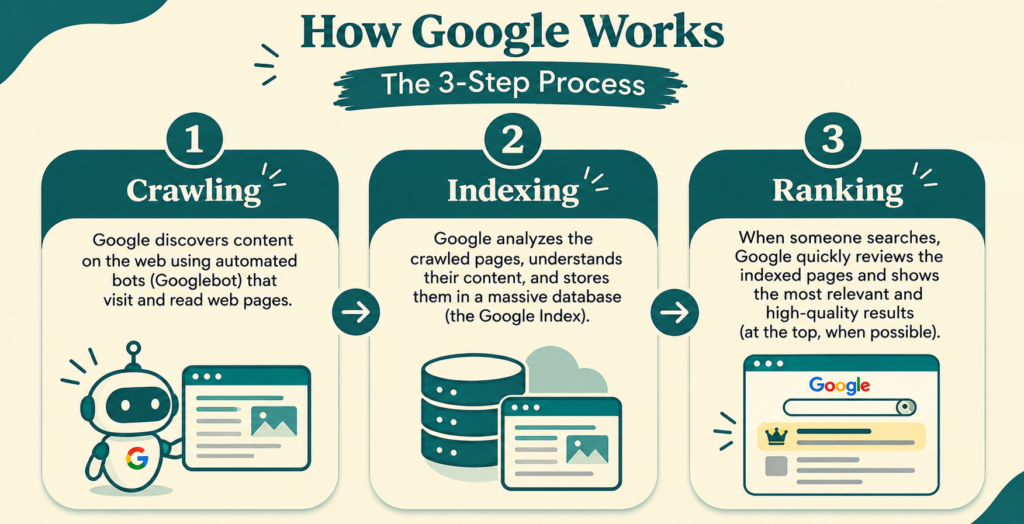
Imagine the nosiest old woman in your neighbourhood. She walks every lane, peeking into each new shop, and nothing escapes her. That is crawling. Back home, she jots down in her notebook who sells what: “Raju: tea and samosas. Meena: sarees.” That is indexing. When you ask, “Where can I get the best tea?”, she doesn’t recite her whole notebook. She names the shop she trusts most, the one with happy customers and a spotless counter. That is ranking.
Google works the same way, just at lightning speed. Type a question into the search bar and the answer appears in under a second, thanks to a three-stage process: discovering pages, storing them, and ordering them by usefulness. Understanding it helps you build a website that search engines can find and people want to read.
The Big Picture
Think of a search engine as a giant library. Crawlers are the scouts who find new books, the index is the catalogue, and ranking is the librarian who picks the best book for your question.
Crawling – Finding Your Pages
Crawling is discovery. Automated programs called crawlers (or spiders) travel from link to link, downloading pages as they go. A page with no links pointing to it is like a house with no road: hard to find.
How crawlers find URLs:
- Following internal and external links
- Reading your XML sitemap, a file that lists your important pages
- Revisiting known URLs to spot updates
- Receiving URLs submitted through Google Search Console
What controls crawler behaviour:
- Robots.txt tells bots which folders to avoid.
- Crawl budget is the number of pages a bot will fetch from your site in a given time. Large sites with slow servers waste it quickly.
- Status codes matter too. A 200 means success, a 301 signals a permanent move, and a 404 tells the bot the page is gone.
Quick tip: Fix broken links and redirect chains so crawlers spend their time on pages that count.
Stage 2: Indexing – Understanding and Storing
Once a page is fetched, the search engine tries to understand it. It renders the page much like a browser would, runs the JavaScript, and reads the text, images, headings and metadata.
The processed information is then stored in a massive database called the index. Instead of searching the live web every time, the engine looks up words and topics in an inverted index, which works like the index at the back of a textbook: each term points to the pages that mention it.
What the engine extracts during indexing:
- Title tag and meta description
- Headings (H1 to H6) that reveal page structure
- Main topic, related entities and keywords
- Image alt text and video details
- Structured data (schema markup) that labels products, reviews, events or FAQs
- Language and location signals.
Why pages get left out of the index:
Cause
What It Means
Noindex tag
You told the engine to skip the page
Thin content
The page adds little value
Duplicate content
A near-identical page already exists
Canonical tag
Another URL is marked as the preferred version
Poor quality or spam signals
The page fails quality checks
Since Google moved to mobile-first indexing, the mobile version of your page is the one that gets evaluated. If key content is missing on mobile, it may never be counted.
Stage 3: Ranking – Choosing the Best Answer
When someone searches, the engine first interprets search intent. Is the person looking to learn, compare, buy or find a location? It then pulls matching pages from the index and orders them using hundreds of signals.
Major ranking factors:
- Relevance: Does the content answer the query, including related subtopics and synonyms?
- Content quality and E-E-A-T: Experience, Expertise, Authoritativeness and Trustworthiness. A page written by a knowledgeable author with credible sources earns more confidence.
- Backlinks: Links from respected sites act like recommendations. Google’s original PageRank idea still shapes this today, though context and anchor text now matter as much as quantity.
- Page experience: Fast loading, stable layouts and responsive design, measured through Core Web Vitals.
- Mobile usability and HTTPS security
- Freshness: Important for news and trending topics, less so for evergreen guides.
- Location and personalisation: A search for “dentist” shows nearby clinics, not the best in the world.
The results page (SERP) also contains more than ten blue links. Featured snippets, local packs, image carousels and People Also Ask boxes all compete for attention, and well-structured content has a better chance of appearing in them.
Crawl, Index, Rank: A Practical Checklist
Goal
Action
Help bots discover pages
Submit an XML sitemap, build clean internal links
Avoid wasted crawling
Fix 404 errors, block low-value URLs in robots.txt
Get indexed
Publish original, useful content with clear headings
Prevent duplication
Use canonical tags and consistent URLs
Earn rich results
Add schema markup
Improve rankings
Match search intent, speed up the site, earn quality backlinks
Monitor progress
Check Coverage and Performance reports in Search Console
Common Myths
- “Crawled means indexed.” Not always. A page can be fetched and still be rejected for quality reasons.
- “Indexed means ranking.” Being in the index only makes you eligible. Competition decides the position.
- “More keywords means higher rank.” Stuffing keywords hurts readability. Covering a topic naturally, with related terms and clear answers, works better.
Final Thoughts
Search visibility follows a simple sequence: be discoverable, be understandable, be valuable. Crawlers need clear paths, the index needs well-organised content, and ranking systems reward pages that genuinely satisfy the searcher. Get the technical foundation right, write for real people, and the algorithms tend to follow.
If you are just getting started, my SEO for beginners guide is the best place to understand the basic concepts before delving deep in to the technical side.